
AliExpress - Shopping App
Alibaba MobileShopping
4.2212.37K Reviews
- Version
- 8.180.1
- Installs
- 500.00M
- Age Rating
- Teen
Screenshots

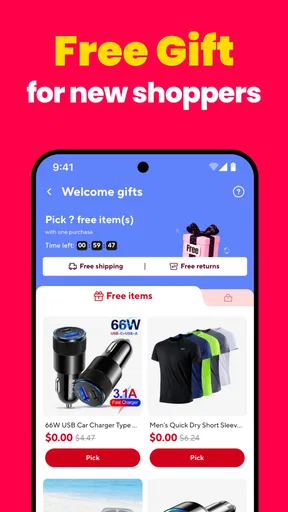
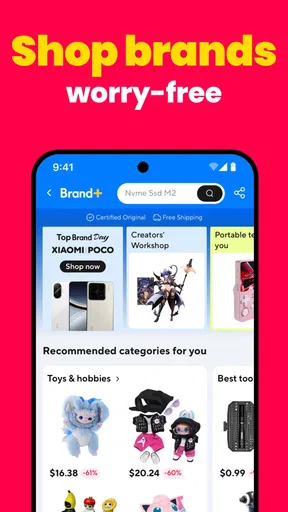

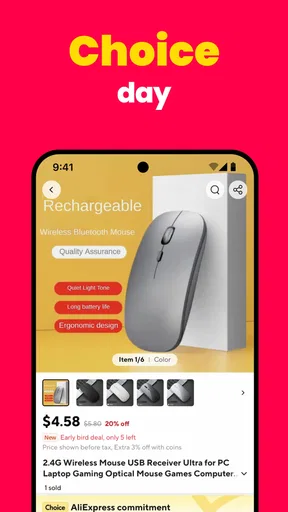


Our Review of AliExpress - Shopping App
 Analysis by Appyee
Black Friday shopping can turn a simple search into a maze of competing offers, and I find it helps to slow down before tapping “buy.” AliExpress is a free shopping app from Alibaba Mobile, built around a wide selection of goods from sellers around the world. Its appeal is easy to understand: I can browse many kinds of products in one place, compare options, and look for a price that suits my budget. The app has been available since September 27, 2012, and its current version is 8.172.0 for devices running Android 5.0 or later. It is rated Teen, so it is not intended for young children to use without appropriate guidance.
Finding value beyond the sale banner
Free access is a useful starting point, but it is not the same thing as a guaranteed bargain. There is no charge to install the app; the cost of an order depends on the item and the terms shown when you shop. I treat Black Friday labels as a reason to investigate a listing, not as proof that it is the best price available. Before ordering, I check the full amount displayed at checkout and make sure the product details match what I actually need.
That distinction matters because a low displayed price can be less compelling if the item is not comparable to another option. A cable, accessory, or decorative item may be an easy purchase to assess, while electronics or anything that must fit precisely calls for more careful reading. I compare specifications and photos, then look at customer feedback for clues about materials, sizing, or how the item differs from its pictures. The practical value is not just seeing many products; it is having enough information to decide which listing deserves my money.
Browsing a broad marketplace with a plan
When I first downloaded AliExpress, I was genuinely surprised by the sheer variety of products available. From electronics to fashion, and even quirky gadgets I didn’t know I needed, it’s all there. Navigating through the app is pretty straightforward, which I appreciate because I’m not exactly a tech wizard.
For a Black Friday visit, I would start with a short list rather than scrolling without a goal. If I need a particular phone case, for instance, I search for the exact device model and compare several listings instead of choosing the first result with an eye-catching discount. I check the description for dimensions and compatibility, then use customer photos and comments to see whether the item appears as expected. That workflow takes a little longer, but it can prevent the common mistake of buying something that looks right in a thumbnail and turns out to be the wrong size or version.
What really caught my attention was the Black Friday section. It's like a digital carnival of discounts, with prices dropping faster than my willpower. The app’s design makes it easy to spot these bargains, with a dedicated section just for Black Friday deals. One swipe and you’re in shopping heaven!
Still, I would use that section as a discovery tool rather than a complete shopping strategy. A crowded sale page can make similar products blur together, so I pause to check seller and item details before adding anything to my basket. If I am buying a gift, I also consider whether the delivery timing shown for the particular order works for the occasion. A tempting offer is not much use if the item is unsuitable or arrives after I need it.
Tools that help, and the checks they cannot replace
One of the coolest features is the customizable alerts. You can set notifications for price drops on items you’ve been eyeing. It’s like having a personal shopping assistant whispering in your ear, "Hey, now’s the time to snag that deal!"
Alerts are most useful when I already know what I want. I would save a specific item, then use a notification as a prompt to revisit its current listing rather than treating it as an automatic signal to purchase. The price is only one part of the decision: I still check whether the selected variant is the one I intended, whether the listing details have changed, and what the final checkout amount shows. This is a small habit, but it helps keep a sale notification from turning into an impulse order.
I also love the buyer protection policy. It gives peace of mind knowing that if something goes wrong, you’re covered. In the often unpredictable world of online shopping, that’s a huge plus.
Even with that reassurance, I would not treat protection as a substitute for careful shopping. I read the order details before paying and keep the purchase information available in case I need to follow up. For a more expensive or time-sensitive item, I would be especially deliberate about checking the listing and the order terms. The peace of mind is useful, but I still prefer to reduce avoidable surprises before they happen.
What the shopping experience feels like
The interface is user-friendly, with categories clearly laid out. The search function is robust, ensuring you can find whatever you’re looking for without breaking a sweat. Plus, the customer reviews are a lifesaver. They give you a genuine feel for the product quality before hitting that "buy" button.
Reviews are more helpful when I read them for specifics instead of relying on a star score alone. For clothing, I look for comments about fit and fabric; for a small gadget, I want to know whether it performs the basic task described. Recent customer photos can also help me judge appearance, although one buyer’s experience is not a guarantee that every order will be identical. If feedback is sparse or too vague to answer my main question, I would rather keep looking than guess.
During Black Friday, the app does get a bit crowded. Sometimes it feels like maneuvering through a busy marketplace, but that’s part of the excitement, right? It’s all about finding that hidden gem at the best price!
For me, the trade-off is clear: the broad choice is a strength, but it can demand more comparison than a smaller retailer’s curated page. When I know the exact model or style, search makes the marketplace manageable. When I am browsing casually, the volume of near-identical options can make it harder to spot meaningful differences. I try to narrow the search with practical terms and avoid filling a cart just because the interface keeps presenting more possibilities.
How it fits alongside other places to shop
Compared with a local shop or a retailer focused on a narrower range, AliExpress is appealing when I want to explore many categories and compare products from different sellers in one app. That breadth is particularly useful for accessories, hobby supplies, and unusual small items that may be difficult to find nearby. A local store or familiar retailer can be the better choice when I need an item immediately, want to inspect it in person, or value a straightforward return process more than browsing a large selection.
It also differs from a focused brand store: a brand’s own app may make it easier to confirm that I am buying a particular model directly from that brand, while this marketplace gives me more listings to compare. For a purchase where exact authenticity, specialized support, or an urgent replacement matters most, I would choose the option that gives me the clearest confidence on those points. For a non-urgent accessory where I can compare descriptions and feedback carefully, the wider marketplace can be worthwhile.
A realistic example is replacing a desk accessory before reorganizing a home workspace. I would search for the item I need, compare a few listings by size and materials, inspect customer feedback, and save the strongest candidate. If an alert later prompts me to revisit it, I would confirm the selected option and the checkout total before ordering. If I needed the accessory for a workday starting tomorrow, I would instead look for a local source or a retailer whose delivery timing better fits that deadline.
Who is likely to get the most from it?
I think the app suits patient shoppers who enjoy comparing listings and do not mind checking details before deciding. It can also work well for someone assembling a list of small, non-urgent purchases and returning to it over time instead of buying everything during one sale rush. With an average rating of 4.3 from around 16 million ratings, and more than 500 million installs, it is clearly a widely used shopping app; that scale is reassuring as a sign of reach, but it does not tell me whether an individual listing will meet my expectations.
I would be more cautious if I needed a product urgently, had little tolerance for comparing near-identical options, or could not accept uncertainty about how a listing will match its description. A shopper who wants to handle an item before paying may be happier in a physical store. Someone choosing a high-stakes or specialist product may prefer a retailer with more direct expertise and support. The best choice depends on what matters for that purchase, not on how dramatic a Black Friday banner looks.
My verdict before placing an order
In conclusion, if you’re keen on snagging incredible deals, AliExpress is definitely worth checking out, especially during Black Friday. It’s like having a global market at your fingertips, ready to deliver right to your door. Just remember to keep your wishlist ready because once Black Friday hits, it’s a shopping frenzy like no other!
So, whether you’re a seasoned shopper or just looking to save a few bucks, give this app a whirl. Who knows, you might just find your next favorite thing!
My recommendation is to install it if you want a broad marketplace to browse for non-urgent purchases and are willing to do a little homework on each listing. The free app makes it easy to look around without committing to a purchase, while the order itself still deserves the same checks I would make anywhere: confirm the item, read the details, consider the feedback, and review the amount before paying. If those steps sound like more effort than you want for a simple purchase, a familiar nearby retailer may be the easier fit. If you enjoy comparing choices and can shop patiently, this app is worth a place in your shopping toolkit.
Privacy and Permissions
See what permissions an app requests and how it handles your data.
- Identity
- find accounts on the device, add or remove accounts
- Calendar
- add or modify calendar events and send email to guests without owners' knowledge
- Contacts
- find accounts on the device
- Location
- approximate location (network-based), precise location (GPS and network-based)
- Phone
- read phone status and identity
- Photos/Media/Files
- read the contents of your USB storage, modify or delete the contents of your USB storage
- Storage
- read the contents of your USB storage, modify or delete the contents of your USB storage
- Camera
- take pictures and videos
- Microphone
- record audio
- Wi-Fi connection information
- view Wi-Fi connections
- Device ID & call information
- read phone status and identity
- Other
- view network connections, create accounts and set passwords, change network connectivity, connect and disconnect from Wi-Fi, measure app storage space, full network access, read sync settings, reorder running apps, draw over other apps, control vibration, prevent device from sleeping, modify system settings, toggle sync on and off, install shortcuts, uninstall shortcuts
How AliExpress - Shopping App Compares
Full ComparisonChoose Amazon for broad selection and order tracking, Temu for deal-focused browsing, or AliExpress for global variety and buyer protection.
| App | Developer | Rating | Price |
|---|---|---|---|
 Amazon Shopping | Amazon Mobile LLC | 4.4 | Free |
 Temu: Shop Like a Billionaire | Temu | 4.4 | Free |
 AliExpress - Shopping AppThis App | Alibaba Mobile | 4.2 | Free |
Verdict
Strengths of AliExpress - Shopping App
- Wide range of products and categories.
- Regular discounts and special offers.
- User-friendly interface and navigation.
- Secure payment options available.
- Buyer protection ensures safe purchases.
Limitations of AliExpress - Shopping App
- Shipping times can be quite long.
- Customer service response is slow.
- Quality can vary between sellers.
- In-app ads can be intrusive.
- Returns process can be complicated.
Other Releases by Alibaba Mobile
View All
Alibaba.com - B2B marketplace
Shopping4.4
Similar Picks in This Category
View All
SHEIN-Shopping Online
Roadget Business PTE. LTD.4.8

Amazon Shopping
Amazon Mobile LLC4.4


Mercado Libre: Compras online
Mercado Libre4.8

Wish: Shop and Save
Wish US Holdings LLC4.7
Alibaba.com - B2B marketplace
Alibaba Mobile4.4
You May Also Like
View All


Frequently Asked Questions
What is AliExpress and how does it work?
AliExpress is an online retail service based in China, offering a variety of products at competitive prices. Users can browse through categories such as electronics, fashion, and home goods. The app allows for direct purchasing from suppliers, and features like buyer protection and secure payment options enhance the shopping experience.
How does AliExpress handle shipping and delivery?
AliExpress offers multiple shipping options ranging from standard to express delivery. Shipping times vary based on the seller's location and the buyer's destination. It's essential to check the estimated delivery time provided by each seller. Tracking options are available for most shipments to keep users updated on their order status.
What payment methods are accepted on AliExpress?
AliExpress accepts a wide range of payment methods including credit and debit cards, PayPal, and other regional payment options. The platform uses secure encryption to protect users' financial information. Before purchasing, it's advisable to review the accepted payment methods for each seller to ensure a smooth transaction.
How reliable is the product quality on AliExpress?
Product quality on AliExpress can vary, as it hosts numerous sellers. It's crucial to read reviews and check ratings for each product and seller. Detailed descriptions and customer feedback can provide insights into product quality. Buyer protection policies also offer refunds or replacements if the product doesn't meet expectations.
What should I know about AliExpress during Black Friday?
During Black Friday, AliExpress offers significant discounts and promotional deals. Users should prepare by creating wishlists and setting reminders for specific deals. High traffic can lead to limited stock and longer processing times, so acting quickly is advised. Keep an eye on the app for flash sales and limited-time offers.
